Quiet Forest Numbers:
maths without a timer
When Seeds was invited to contribute ideas to a maths app, we thought carefully about what it could offer. Quiet Forest Numbers gives children time to think, with one sum at a time, no countdown and adjustable sound.
Quiet Forest Numbers is by Nightlight Studios, with ideas contributed by Nisha Bal from Seeds Occupational Therapy.
For iPhone. Check the current price and device requirements.
At Seeds, we are cautious about adding screen time to a child’s day. When we were asked to contribute to the development of Quiet Forest Numbers, we thought carefully about the place an educational app could have.
We see that place as small and purposeful: a way to practise a familiar maths idea, alongside play, movement, conversation and learning with real objects. Our contribution focused on making room to think and try again, with a simple presentation and fewer demands on the child’s attention.
Neurodivergent children have different preferences. One child may enjoy animated characters and challenges; another may prefer fewer sounds, a repeated format and less happening on screen. The same child may want a different experience on another day.
Our connection to Quiet Forest Numbers: Nisha Bal, Principal OT at Seeds, was consulted during its development. She contributed ideas about removing time pressure and prizes to chase, keeping the presentation simple, making repetition enjoyable and including adjustable music. Quiet Forest Numbers is by Nightlight Studios. We are sharing Quiet Forest Numbers because we helped shape it. This article introduces that work and the thinking behind it.
Gentle arithmetic practice
Quiet Forest Numbers
Quiet Forest Numbers puts one sum at a time into a forest scene. Children can practise addition, subtraction, multiplication and division, with different forest settings for the four operations. They can also choose which times tables to practise.
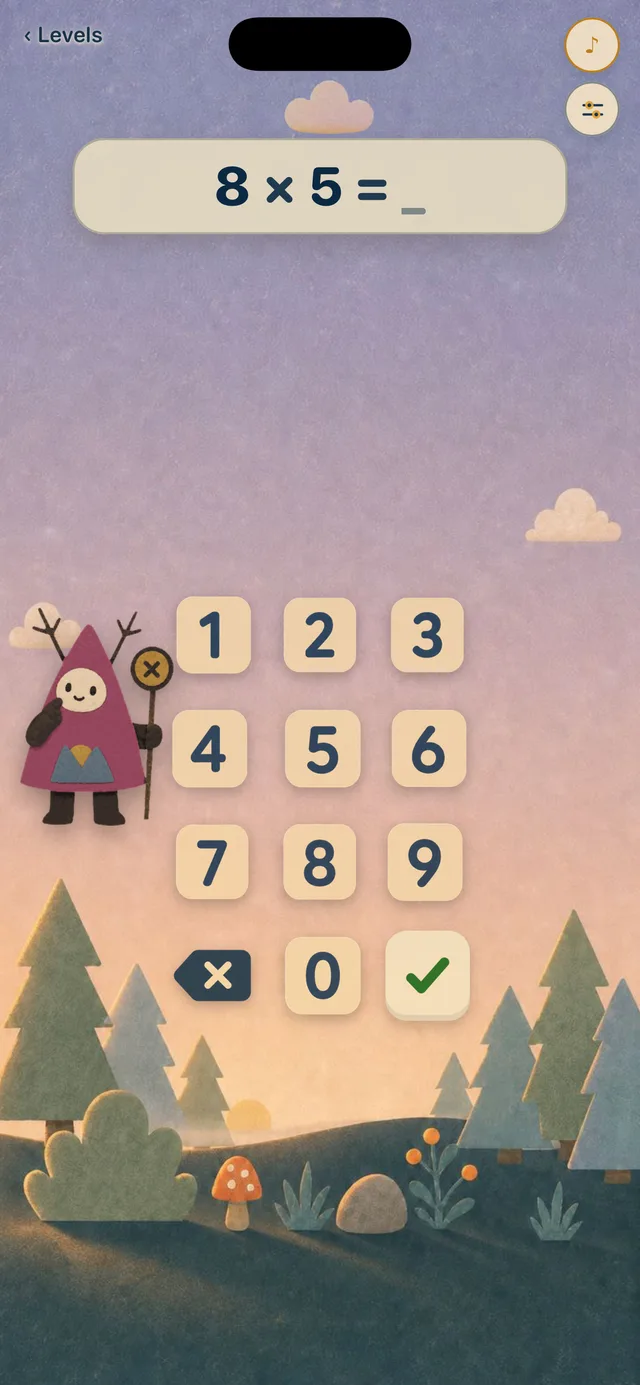
Nisha’s contribution centred on giving children room to think: no countdown, no race against other players and no prizes to chase. The intention was a simple, predictable experience that could be enjoyable to return to. That describes the design approach, rather than promising how every child will feel.
The app still provides feedback. Correct answers play notes, and a small star count records solved answers. Those details matter when deciding whether it suits a child who finds any visible progress count distracting. Incorrect answers do not trigger an error sound; a short message invites another try.
An ambient music mixer includes music, rain and forest sounds, with controls for adjusting the soundscape. Some children may enjoy making that little forest their own; others may prefer less sound. Let your child help choose.
This is an option for practising arithmetic a child has already begun to understand. Keep counters or drawings nearby when a written sum needs explaining. Quiet Forest Numbers is designed for iPhone; its App Store listing has the current price and device requirements.
Other options
How it compares with other maths apps
Quiet Forest Numbers focuses on arithmetic practice. Other tools offer different ways to explore quantities or a broader learning library. These examples may help you choose according to a particular learning purpose.
| App | A starting point | Access |
|---|---|---|
| Quiet Forest Numbers | One arithmetic question at a time, without a countdown | iPhone; check the current App Store price |
| Number Frames | Arranging counters to see quantities and number relationships | Free; browser and iPad |
| DragonBox Numbers | Combining and splitting number characters; publisher ages 4–8 | Paid access; Australian listing: Kahoot! DragonBox Maths Games |
| Khan Academy Kids | Early maths within a broader learning library; ages 2–8 | Free family app; Apple, Android and Amazon devices |
On a small screen, scroll across the table for access details.
App features, prices and device requirements can change. Publisher information checked 20 October 2026; check the linked listing before downloading.
Seeing quantities
Number Frames
Number Frames from The Math Learning Center lets children place counters into frames of five, ten, twenty or one hundred, or create their own frames. They can see how quantities fit together, alongside the written numerals. It is free and available through a browser and as an iPad app. The publisher’s Number Frames page links to both versions.
Its open workspace gives an adult room to introduce one small idea: “We have seven. How many spaces are left to make ten?” It may suit children who enjoy arranging and comparing objects. Because it is a tool rather than a guided course, expect to explore it together initially.
Exploring number relationships
DragonBox Numbers
DragonBox Numbers uses characters called Nooms that children can combine, split and compare. The publisher recommends it for ages four to eight. Its Sandbox lets children experiment with these quantities, while other modes introduce puzzles and challenges.
Choose the activity carefully if speed or rewards are uncomfortable. Other modes include coins and unlocks, and Run asks for quick calculations while navigating obstacles. Sandbox is a useful starting point for exploring at a child’s own pace. The official DragonBox Numbers activity guide explains the different modes.
In the Australian App Store, it is listed as Kahoot! DragonBox Maths Games. Paid access options apply; check the current listing and terms before downloading.
A broader free library
Khan Academy Kids
Khan Academy Kids combines early maths with books, language and other activities for ages two to eight. The family mobile app is free, with no ads or subscriptions, and is available on Apple, Android and Amazon devices. Children can follow an adaptive learning path or choose activities in its Library. See the Khan Academy Kids overview and supported-device guide.
For a focused maths session, try selecting an activity from the Math Library together. Background music can be muted, although that does not turn off all narration and effects. Animated characters and collectible rewards are part of the experience, so preview them with your child.
Internet is needed for the full learning library. A smaller collection, Kodi’s Suitcase, is available offline. The parent guide explains the Library and offline content; the music-control guide shows how to mute background music.
Choosing together
Look at the experience as well as the answers
Look beyond whether your child can complete the questions. Can they understand what to do next? Is there time to think? Can they adjust the sound? Do they enjoy returning, and can they leave without feeling they must finish another challenge?
Individual sensory preferences deserve attention. NICE guidance for services supporting autistic children asks them to consider sensitivities to noise, lighting and the visual environment. CAST’s learning-design guidance similarly recommends varying sensory stimulation, pace and breaks to fit learners. These principles support offering choices; they do not identify one ideal sensory setting for every child. The sources and their scope are set out below.
Choose one maths idea to explore, try the app briefly together and agree on a stopping point beforehand. Notice what your child is working out, whether the sound and feedback are comfortable, and what happens when it is time to finish. Keep room in the day for sleep, movement, play and connection. Our guide to screen time and its place in a child’s day explores that wider balance.
Beyond the screen
Connect the app to everyday maths
If the screen shows three plus two, try moving three blocks and two blocks into one group, then connect that action to the written sum. The Education Endowment Foundation emphasises helping children make these links between objects, representations and mathematical ideas.
Follow your child’s interest in numbers through sharing snacks, sorting toys, making patterns or counting steps. These everyday experiences deserve space in their own right. An app can have a small place within that fuller day, leaving room for your child’s questions, their preferred way of communicating and their pace.
Sources and context
What informs this guide
App descriptions are based on the publisher and store pages linked in each section. Nisha’s involvement in Quiet Forest Numbers is disclosed above. The guidance below informs the broader discussion of sensory choices and learning with objects; it does not test or rank these four apps.
- NICE, guideline CG170, recommendation 1.1.9. Autism spectrum disorder in under 19s: support and management. This service guidance addresses adjustments to the physical environment, including individual sensory sensitivities. Applying that attention to an app’s sound and visual presentation is a practical interpretation.
- CAST, Universal Design for Learning Guidelines 3.0 (2024), consideration 7.4. Address biases, threats, and distractions. It describes options for varying background noise, visual stimulation, pace, session length and breaks according to learners’ needs.
- Education Endowment Foundation, Improving Mathematics in the Early Years and Key Stage 1. Use manipulatives and representations to develop understanding. Its guidance stresses making explicit connections between objects, pictures, symbols and the maths they represent, rather than assuming that moving counters alone establishes understanding.
Quick answers
What is Quiet Forest Numbers?
Quiet Forest Numbers is an iPhone maths app for practising addition, subtraction, multiplication and division. It presents one sum at a time without a countdown, with selectable times tables and adjustable music and nature sounds. It is by Nightlight Studios, with Nisha Bal from Seeds contributing ideas during development.
How do I choose a maths app for a neurodivergent child?
Start with a clear maths idea and something your child enjoys. Try the app briefly together and agree on a stopping point. Preview the pace, instructions, sounds and feedback, and notice how finishing feels. Keep room for play and learning away from the screen.
Which of these maths apps are free?
Number Frames from The Math Learning Center is free in a browser and on iPad. The family Khan Academy Kids app is also free, with no ads or subscriptions. Check the current store listings for Quiet Forest Numbers and DragonBox paid access options.
Which option offers arithmetic practice without a timer?
Quiet Forest Numbers presents one sum at a time without a countdown or a race against other players. It covers addition, subtraction, multiplication and division. Correct answers play notes and a small star count records solved answers, so preview that feedback with your child too.
Does this sound like your child?
No referral is needed. Tell us what a day looks like at home, and we will talk it through before anything else.